
Quantity Reference
Quantity Reference
- Quantity Reference
- 1. Measure using
Qty - 2. Constructing quantities
- 3. Reading a quantity
- 4. Arithmetic and dimensions
- 5. Converting units
- 6. Formatting and small helpers
- 7. Practical patterns
- 8. Common mistakes
- 9. API summary
1. Measure using Qty
Qty represents a numeric value together with a unit of measure.
It is the normal quantity type for calculator authors. Import it from qcore if you are
creating backend calculator:
from qcore import Qty
For frontend calculator, you do not need to import it.
Use Qty at the input and output boundaries of a calculator:
- turn input strings into quantities
- perform dimensional arithmetic, and
- return quantities in expected format.
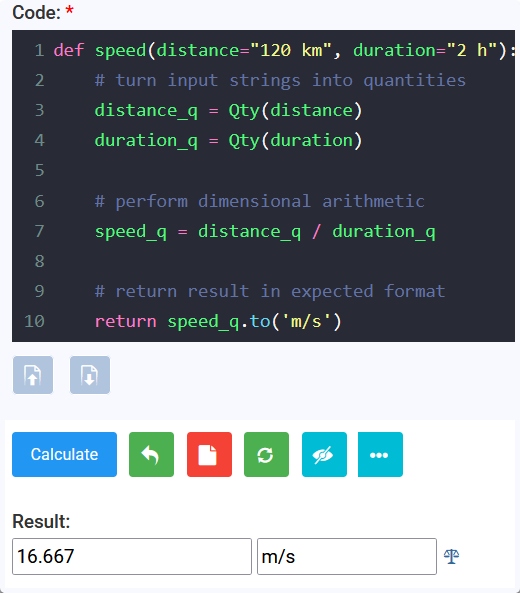
def speed(distance="120 km", duration="2 h"):
    # turn input strings into quantities
    distance_q = Qty(distance)
    duration_q = Qty(duration)

    # perform dimensional arithmetic
    speed_q = distance_q / duration_q

    # return result in expected format
    return speed_q.to('m/s')

speed() # run the function
The result is 16.667.0 m/s. You can copy the code above and paste in qCalc eva
and give it a try:
Tip: Instead of using
Qty(), you can use its shortcut,q(), in your expression or calculator code. For example, useq('5m')instead ofQty('5m').
By the way you can have either double quote (") or single quote (') around the string as it is normal in python. So q('5m') and q("5m") does the same thing.
2. Constructing quantities
2.1 From a quantity string
The usual form is a number followed by a valid unit expression:
length = Qty("2.5 m")
rate = Qty("72 km/h")
area = Qty("12 ft^2")
mass_density = Qty("2400 kg/m^3")
Numbers may be signed, decimal, or use scientific notation:
tiny = Qty("1e-6 m")
debt = Qty("-25 USD")
The unit expression is resolved by qCalc's unit catalog. Use *, /, ^, or **
to combine and power units.
For example, m/s^2, N*m, kg/m^3, and ft**2 are valid forms.
2.2 From a value and unit
Pass a Python number and a valid unit string when the number is computed in your calculator:
radius = Qty(12, "cm")
volume = Qty(4 / 3 * 3.14159 * radius.val ** 3, "cm^3")
This is particularly useful for returning a calculated scalar with its unit:
return {"Monthly Cost": Qty(monthly_cost, "USD/mo")}
2.3 Parse and convert in one step
Supply a target unit as the final argument. The resulting object is already converted:
height_cm = Qty("5 ft, 10 inch", "cm")
distance_km = Qty(5280, "ft", "km")
area_m2 = Qty(900, "ft^2", "m^2")
Qty(existing_qty, "unit") is also supported:
distance = Qty("3 mi")
distance_km = Qty(distance, "km")
For normal input strings, prefer Qty(value).to("unit") when the conversion is part of the calculation flow;
it makes the operation obvious to the reader.
2.4 Multi-part values
A comma-separated string is treated as a sum of compatible quantities. This is convenient for human-friendly durations and lengths:
duration = Qty("1 hr, 45 min, 30 sec")
height = Qty("5 ft, 10 inch")
angle = Qty("23 deg, 26 mina, 22 seca")

print(duration.to("min"))    # 105.5 min
print(height.to("inch"))     # 70.0 in
print(angle.to("deg"))       # 23.44 deg
Note: qCalc defines minute of arc as
minaand second of arc assecato distinguish them from the duration unitsminandsec.
Each part must be a valid quantity, and the parts must be dimensionally compatible. Comma-separated parsing is for input strings; use ordinary + in calculator logic.
2.5 Value not yet supplied
The @ prefix creates a quantity whose value is None and whose unit is known:
unit_cost = Qty("@USD/m")
unknown_length = Qty("@ft")
This is useful for optional quantity fields or placeholder results.
.to(...) preserves the missing value while changing its unit.
Do not perform ordinary arithmetic with a missing value unless
the specific code path handles it; use .val is None to test it first.
3. Reading a quantity
Qty exposes two author-facing properties:
| Property | Meaning | Example |
|---|---|---|
.val |
Numeric value in the quantity's current unit | Qty("2 ft").val is 2.0 |
.uom |
Current unit expression as a string | Qty("2 ft/s").uom is "ft/s" |
Use .val only after you have normalized to the unit required by the formula.
This avoids mixing raw values from different units:
height_m = Qty('6ft', "m").val
weight_kg = Qty('170lb', "kg").val
bmi = weight_kg / height_m ** 2
print(bmi.val)
str(qty) produces the value and unit, suitable for simple display or text output:
str(Qty("2.5 m")) # "2.5 m"
4. Arithmetic and dimensions
4.1 Addition and subtraction
Both operands must be quantities with compatible dimensions. The result uses the left operand's unit.
total = Qty("2 m") + Qty("30 cm")
print(total)  # 2.3 m

remaining = Qty("1 h") - Qty("15 min")
print(remaining)  # 0.75 h
Adding a quantity to a scalar, or adding incompatible quantities
such as metres and seconds, raises TypeError.
4.2 Multiplication and division
Multiply or divide by a number to retain the original unit. Multiply or divide two quantities to create the appropriate compound unit.
area = Qty("3 m") * Qty("2 m")
speed = Qty("100 km") / Qty("2 h")
discounted = Qty("25 USD") * 0.9
If quantity multiplication or division cancels every dimension,
qCalc returns a plain numeric value rather than a Qty:
ratio = Qty("150 cm") / Qty("1.5 m")
assert ratio == 1.0

periods = int(Qty("5 yr") / Qty(1, "mo"))
assert periods == 60
Wrap a scalar back in Qty when you want to give the result an explicit unit:
rate_percent = Qty(annual_rate * 100, "pct/yr")
4.3 Powers and mathematical functions
Raise a quantity only to a dimensionless exponent:
area = Qty("3 m") ** 2
side = Qty("9 m^2").sqrt()
For trigonometry, use the quantity methods. They accept angle units and return plain numeric values:
rise = Qty("30 deg").sin() * run.val
Qty() object's sin(), cos(), and tan() require an angular unit and raise TypeError for other dimensions.
for numeric values you can use math's function
x = Qty('90 deg').sin()
y = math.sin(pi/2) # or simply sin(pi/2) in eva
print(x, y)
4.4 Comparisons and truthiness
Quantities can be compared only with compatible quantities:
if Qty("3 ft") < Qty("1 m"):
    ...
bool(qty) is false when its value is zero. Test missing values explicitly because Qty("@m") is not a useful substitute for a boolean condition:
length = Qty(user_length)
if length.val is None:
    return {"Length": Qty("@m")}
5. Converting units
5.1 .to(unit)
.to(...) returns a new quantity in the requested compatible unit. It does not mutate the original object.
distance = Qty("3 mi")
distance_km = distance.to("km")

assert distance.uom == "mi"
assert distance_km.uom == "km"
5.2 .to_units(units)
.to_units(...) returns a list containing one converted quantity per requested unit.
Pass either a comma-separated string or a list of unit strings:
speed = Qty("60 mph")
alternatives = speed.to_units("km/h, m/s")
# [Qty(..., "km/h"), Qty(..., "m/s")]
5.3 .in_units_of(*units) and .as_units(units)
.in_units_of(...) expresses one quantity across multiple compatible units,
from largest to smallest, and returns a tuple. This is best for a duration or mixed-unit display:
parts = Qty("3670 s").in_units_of("h", "min", "s")
# (Qty(1.0, "h"), Qty(1.0, "min"), Qty(10.0, "s"))
.as_units(...) returns the same expression in display-ready form.
It accepts a comma-separated string or a list. .as_(...) is an alias.
display = Qty("3670 s").as_units("h, min, s")
# "1.0 h, 1.0 min, 10.0 s"
With one requested unit, in_units_of("cm") returns one Qty, not a tuple.
Use .to("cm") when conversion, rather than decomposition, is what you mean.
5.4 Standard systems and base units
These helpers return an equivalent quantity expressed in standard units for its dimensions:
| Method | System |
|---|---|
.si() or .mks() |
SI / MKS |
.fps() |
Foot-pound-second |
.cgs() |
Centimetre-gram-second |
.in_base_units() |
qCalc base-unit expression |
force = Qty("10 lbf")
force_mks = force.mks()
force_fps = force.fps()
print(force, force_mks, force_fps)
Use these for standardized outputs, diagnostics, or when a formula specifically requires a system.
For normal calculator results, choose the unit your users expect and call .to(...).
6. Formatting and small helpers
6.1 Rounding
.roundoff(decimals=0) rounds the quantity in place and returns that same object.
result = Qty("3.14159 m").roundoff(2)
print(result)  # 3.14 m
Because it mutates, do not call it on a quantity you also need at full precision. Convert or copy first:
rounded = Qty(original).roundoff(1)
6.2 Missing value normalization
.nzq() changes a missing (None) value to 0.0 in place:
optional_fee = Qty("@USD")
optional_fee.nzq()
# now 0.0 USD
Use this only when zero is the intended business meaning of an omitted value.
6.3 Compatibility and category
speed = Qty("10 m/s")
speed.is_compatible("km/h")  # True
speed.is_compatible("kg")    # False

speed.category()              # dimension/category description
.is_compatible(unit) is a useful guard when a calculator accepts a user-selected output unit.
7. Practical patterns
7.1 Normalize inputs, calculate with scalars, restore units
This pattern is useful when the formula is naturally scalar but inputs may use different units:
def body_mass_index(weight="70 kg", height="175 cm"):
    weight_kg = Qty(weight, "kg").val
    height_m = Qty(height, "m").val
    return {"BMI": weight_kg / height_m ** 2}
7.2 Keep quantities through the formula
This pattern lets qCalc carry dimensions for you:
def rectangular_volume(length="2 m", width="50 cm", height="1 m"):
    volume = Qty(length) * Qty(width) * Qty(height)
    return {"Volume": volume.to("l")}
7.3 Preserve the caller's output convention
Read .uom when the result should follow the unit used by the caller:
def double_length(length="3 ft"):
    input_length = Qty(length)
    return {"Double Length": Qty(2 * input_length.val, input_length.uom)}
8. Common mistakes
| Avoid | Use instead |
|---|---|
Qty("2 m") + 3 |
Qty("2 m") + Qty("3 m") |
Using .val before conversion |
Qty(value, "required_unit").val |
Assuming .to(...) changes the current object |
Assign its return: q = q.to("m") |
Treating a cancelled ratio as a Qty |
Expect a plain number from Qty("1 m") / Qty("1 m") |
| Rounding a shared quantity unintentionally | Copy first: Qty(q).roundoff(2) |
Applying math.sin(Qty("30 deg")) |
Use Qty("30 deg").sin() |
9. API summary
| API | Returns | Mutates receiver |
|---|---|---|
Qty("number unit") |
Qty |
No |
Qty(value, "unit") |
Qty |
No |
Qty(value, "from", "to") |
converted Qty |
No |
.to("unit") |
converted Qty |
No |
.to_units("u1, u2") |
list[Qty] |
No |
.in_units_of("u1", "u2") |
Qty or tuple[Qty, ...] |
No |
.as_units("u1, u2") / .as_(...) |
Qty or display string |
No |
.si(), .mks(), .fps(), .cgs() |
Qty or tuple for decomposed units |
No |
.in_base_units() |
Qty |
No |
.roundoff(decimals) |
same Qty |
Yes |
.nzq() |
None |
Yes |
.sqrt() |
Qty |
No |
.sin(), .cos(), .tan() |
number | No |
For form-field annotations that select units, see qCalc field types. For the complete calculator lifecycle and metadata hooks, see the qCalc calculator author guide.